

What you need
A GetMyInvoices account (a trial account works too) and an AI that supports MCP.
GetMyInvoices MCP server
The GetMyInvoices MCP server connects your financial data directly to your AI, for example ChatGPT, Claude, or Microsoft Copilot. Your AI brings together receipts, payments, approvals, and suppliers and answers your questions with your real numbers: What’s still outstanding? What has become more expensive? What’s out of the ordinary? No export, no Excel.
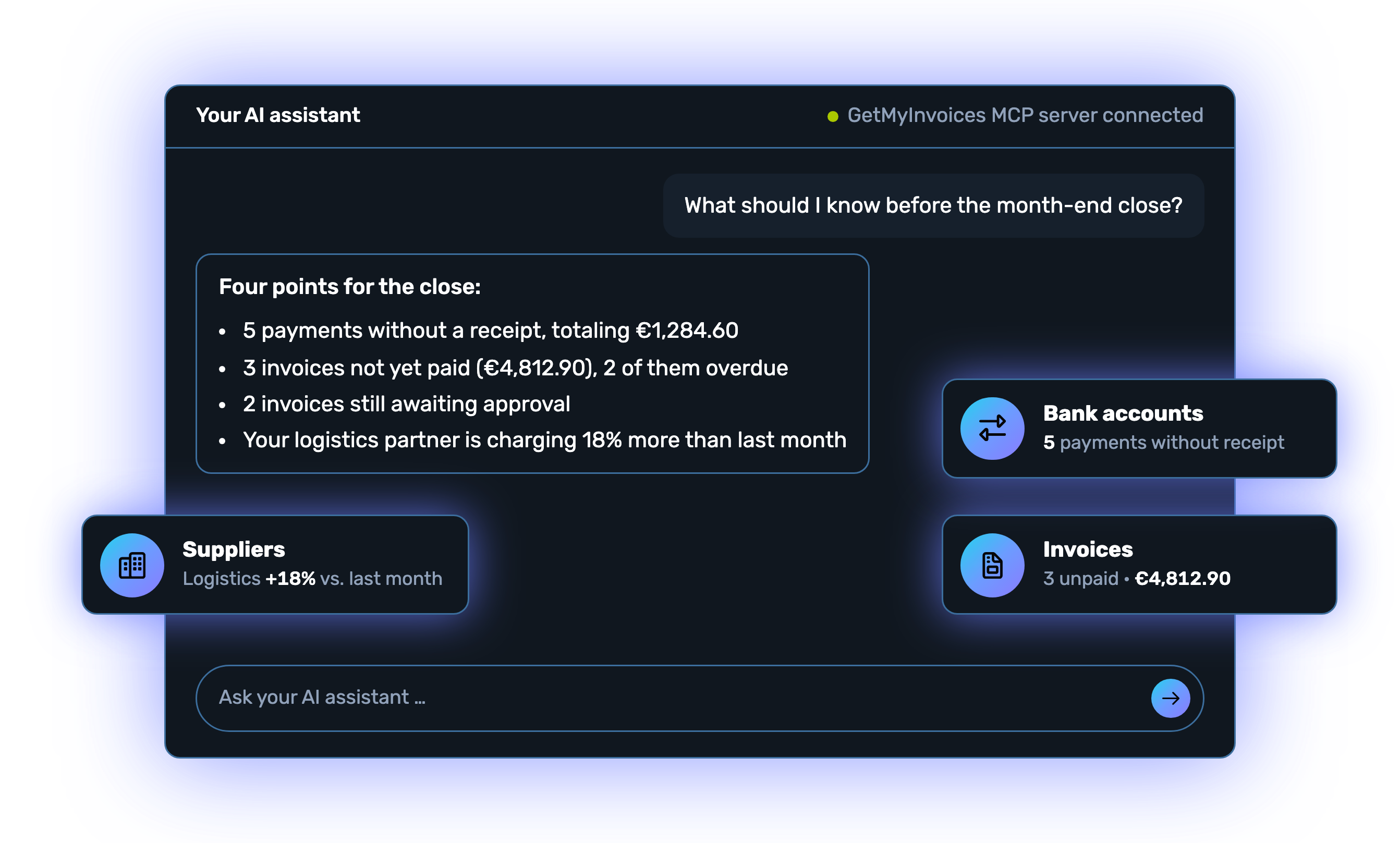
























The GetMyInvoices MCP server connects your GetMyInvoices account to your AI. You ask your question wherever you already work with your AI and get an answer based on your real data. The data comes from GetMyInvoices; the interpretation and explanation come from your AI.



You add GetMyInvoices as a connector in your AI assistant, sign in with your GetMyInvoices account and activate the connection.
https://api.getmyinvoices.com/accounts/mcp-v1/public/index.php
Good to know: Your AI assistant only sees the data your user account is authorized to access in GetMyInvoices.
Depending on your AI assistant, the connection is active right away. Otherwise, activate the connector once more in your connector list before you use it in a chat.
That completes the setup: you can now use GetMyInvoices with your AI assistant and ask it your first questions. We hope you enjoy it.
A GetMyInvoices account (a trial account works too) and an AI that supports MCP.
Your AI reads data. It doesn’t create, approve, or link anything.
You’ll find detailed instructions in the Help Center.
This is what it looks like when you ask your AI about your GetMyInvoices data: one question, one clear answer, and follow-up questions take you deeper.
“Which invoices haven’t been paid yet?” Your AI lists the open invoices with amount and due date and answers the follow-up question about overdue payments.
1 / 5
Every industry has its own questions. Your AI brings together invoices, bank accounts, and suppliers and answers them with your real numbers. Six examples you can ask exactly as written.

Know which ingredients are eating into your margin.

See which client is really worth it.

Notice when infrastructure grows faster than revenue.

Keep your fleet and materials under control before you write your next quote.

See what’s left over from every sale.

Keep salaries, contributions, and invoices on track all month.
35 data access points across six areas, the same as in the GetMyInvoices API. Your AI reads; it doesn’t create or approve anything.












Everyday examples: what you ask, which data your AI reads in GetMyInvoices to answer, and what you can expect as an answer.
| You ask | What your AI reads | What you can expect |
|---|---|---|
| “Which invoices haven’t been paid yet?” | Invoices and receipts Bank accounts and transactions | A list with supplier, amount, due date, and total. |
| “Which suppliers aren’t sending e-invoices yet?” | Invoices and receipts Suppliers | The suppliers whose invoices still arrive as PDF or on paper. |
| “Which documents haven’t been transferred to accounting yet?” | Invoices and receipts Syncs | The outstanding documents, sorted by sync. |
| “How much money came in and went out this month?” | Bank accounts and transactions | Incoming payments, outgoing payments, and the balance of your bank accounts. |
| “Why have our costs gone up?” | Invoices and receipts Suppliers | A comparison with the previous period, showing the biggest cost drivers. |
| “Which suppliers have become more expensive?” | Invoices and receipts Suppliers | The suppliers with their percentage price change. |
| “Which subscriptions are we actually paying for?” | Invoices and receipts Bank accounts and transactions | All recurring invoices with the annual costs per vendor. |
| “Which portals haven’t delivered any invoices recently?” | Companies, suppliers, and portals | Portals with no new documents or with a connection problem. |
| “What should I know before the month-end close?” | Invoices and receipts Workflows and approvals Bank accounts and transactions | A summary: missing receipts, pending approvals, unpaid items, and outliers. |
Sample answers. What exactly your AI returns depends on your data in GetMyInvoices and on your AI.
No. MCP access only allows retrieving and analyzing data. Your AI assistant cannot use it to create, change, approve or delete documents, bookings, accounts or settings.
You need an AI application that supports MCP, for example ChatGPT, Claude, Microsoft Copilot, or Langdock.
The MCP server is included in every GetMyInvoices plan at no extra cost, even during the trial period.
You add GetMyInvoices to your AI assistant, for example Claude or ChatGPT, as a connector: in the connector or MCP settings, you create a new, possibly custom connector and enter a name and the server URL. Then you sign in with your GetMyInvoices account, confirm the read-only access and activate the connector if it isn’t active right away. You can find more information in our Help Center.
With some AI clients, a new connector can initially only be added for the entire organization by a person with administrator rights or by the workspace owner. It then appears in the connector list of all members, and each person only needs to activate it there for themselves. If you don’t see the MCP option at all, please contact your administrator.
Your AI assistant has around 35 functions that give it direct, structured access to your real GetMyInvoices data, in areas such as:
The data comes from GetMyInvoices; your AI provides the interpretation and explanation. It does the math, makes comparisons, and recognizes connections based on its own knowledge.
Yes. You can test GetMyInvoices with no obligation and no risk. The MCP server is included in the trial period.